

Semiconductor manufacturing in Malaysia covers a wide range of operations, from front-end processing to assembly, test, and packaging. In all of them, a factory system can only manage what it can communicate with. SECS/GEM solutions in Malaysia give fabs, OSAT facilities, and equipment makers a standard way to connect tools to the factory host, so status, alarms, recipes, and production data move without manual effort.
This guide explains how SECS/GEM connectivity works, how to approach legacy equipment, and how to choose a solution that fits your tools.
What SECS/GEM Does for Equipment Connectivity
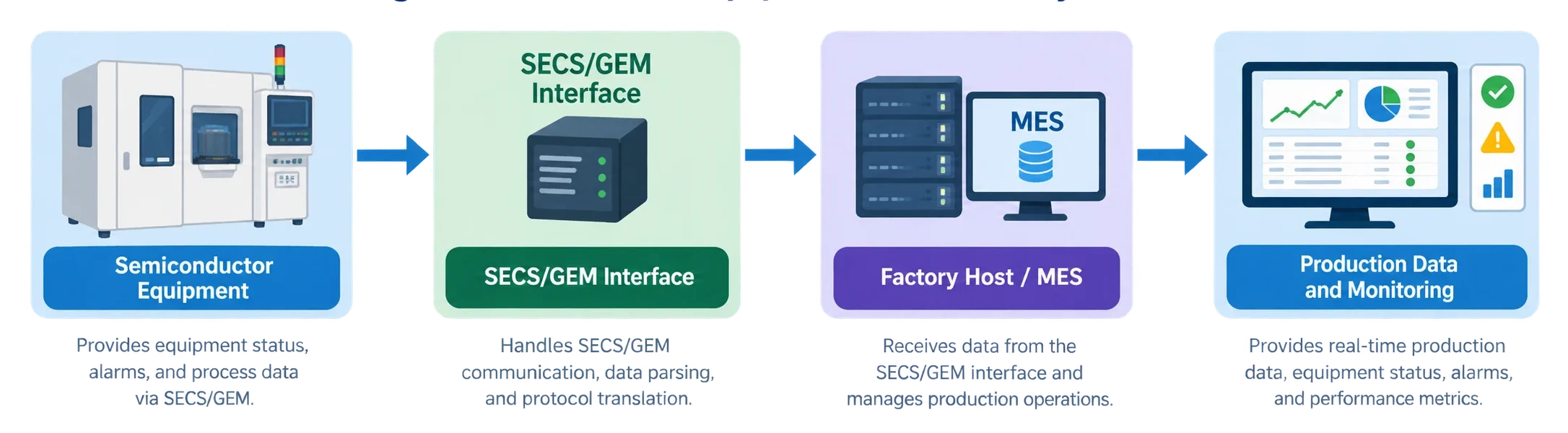
SECS/GEM is the SEMI-standard way for equipment to talk to a factory host or MES. It defines how a tool reports its state, sends events and alarms, and accepts remote commands.
In practice, a connected tool can:
- Report its current status to the host.
- Send alarms and event notifications as they happen.
- Share process and production data for monitoring.
- Accept recipe selection or remote commands, where the integration supports it.
Why It Matters for Malaysian Fabs and OSATs
Many Malaysian facilities run a mix of newer and older tools from different vendors. Connecting them consistently is what makes a smart-fab initiative practical.
- Fewer manual steps: Less manual logging and transcription of equipment data.
- Faster response: Alarms and status changes reach the host immediately.
- Better traceability: Production data from many tools lands in one system.
- A foundation for analytics: Reliable equipment data supports monitoring, FDC, and OEE work later on.
For equipment OEMs selling into the region, built-in SECS/GEM support is often a customer expectation.
Software-Based vs. Hardware-Based SECS/GEM Connectivity
There are two broad routes. Software-based approaches embed or bridge SECS/GEM in the equipment’s own software or control layer. Hardware-based approaches add an external device that connects to the tool. The right choice depends on your equipment interfaces, configuration, and factory requirements.
| Factor | Software-Based | Hardware-Based |
|---|---|---|
| Implementation Approach | Uses an SDK or software layer integrated into equipment software, or a bridge to PLC/HMI data. | Uses an external unit between the equipment and factory network. |
| Suitable Equipment Types | New equipment under development and PLC/HMI-based tools. | Existing equipment where software modifications are impractical. |
| Legacy Equipment Integration | Possible when controller software or PLC data is accessible. | Suitable for equipment that does not currently support SECS/GEM, depending on available interfaces. |
| Interface Requirements | Requires access to controller software or PLC/HMI data. | Depends on the product and available interfaces, such as display or USB connections. |
| Deployment Considerations | Requires development or configuration, followed by testing. | Installed externally, then configured and tested with the factory host. |
| Maintenance and Scalability | Updated alongside equipment software; rollout depends on the implementation. | Managed per tool, requiring planning for fleet-wide deployment. |
Integrating Legacy Equipment: A Practical Process
Older tools are often the biggest connectivity gap. A structured process reduces risk.
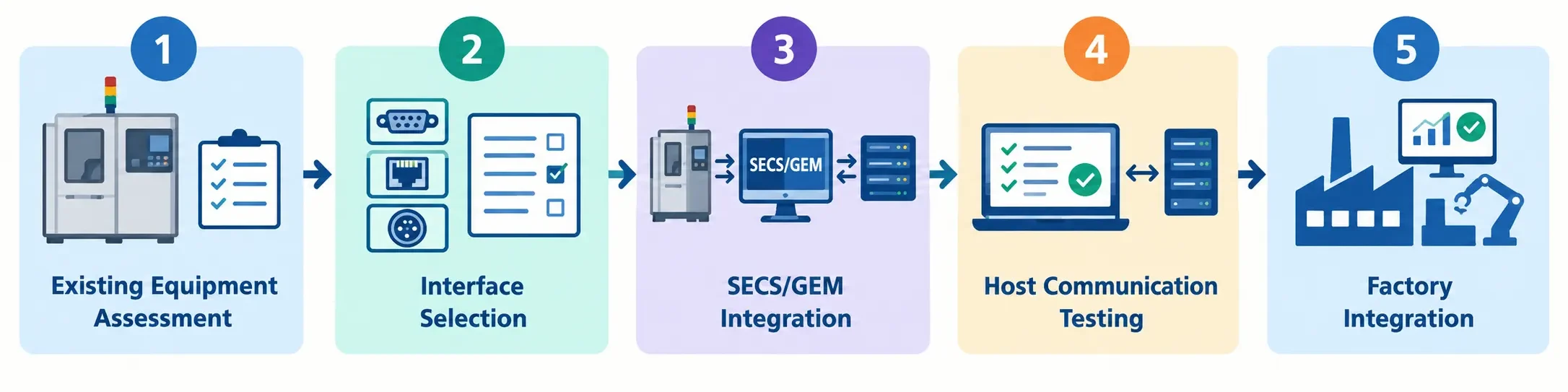
- Assess the equipment. Document the controller, available ports, and the data you need.
- Select the interface. Choose the integration route that fits what the tool exposes.
- Integrate SECS/GEM. Configure the data items, events, alarms, and commands.
- Test host communication. Validate messages with a simulator or the actual host.
- Integrate into the factory. Connect to the MES and confirm production workflows.
The Smart Fab Connectivity Picture
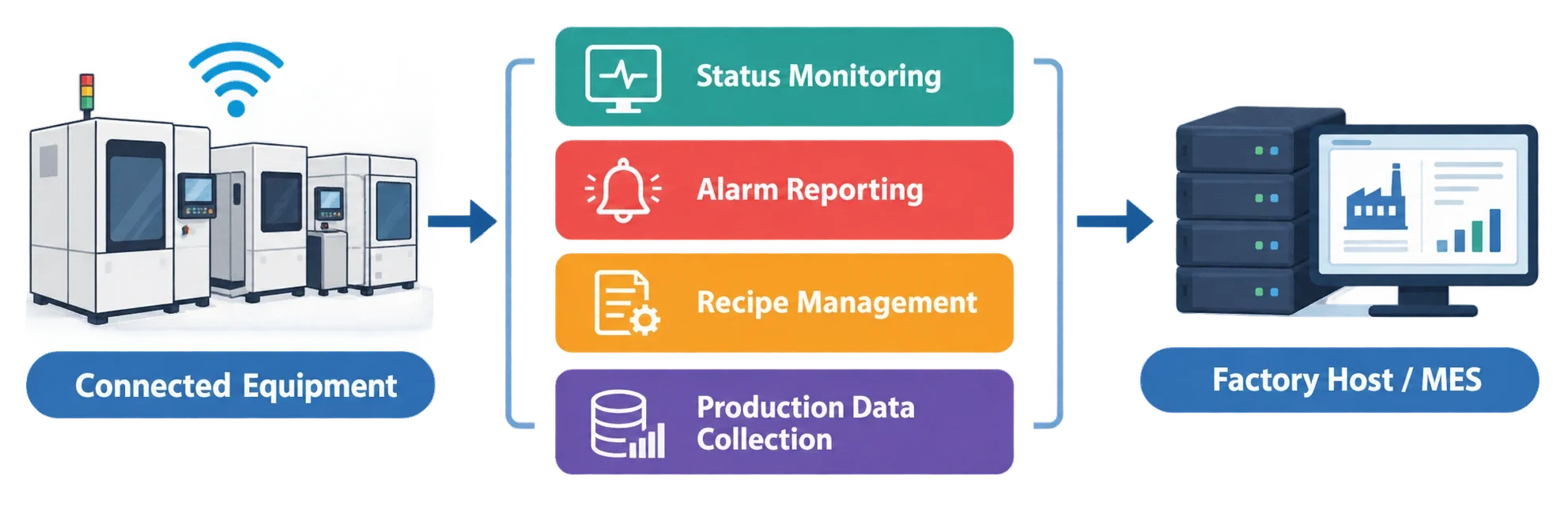
Once tools are connected, each function feeds a different part of daily operations. Status monitoring shows what is running. Alarm reporting flags problems. Recipe management supports consistency, and data collection supports traceability.
Common Connectivity Challenges and Solutions
| Challenge | Impact on Workflows | SECS/GEM-Based Approach | Operational Benefit |
|---|---|---|---|
| Tool Has No Host Interface | Manual data entry and delayed equipment visibility. | Add SECS/GEM connectivity through an external unit or software bridge. | Automated data exchange with the factory host. |
| Mixed Equipment Vendors | Inconsistent communication methods and data formats. | Standardize equipment communication using SECS/GEM messaging. | Consistent communication across connected tools. |
| PLC/HMI-Only Controls | Equipment data remains limited to local screens. | Bridge accessible PLC/HMI data into SECS/GEM messages. | Equipment data becomes available to the MES. |
| Unverified Implementation | Integration delays during host commissioning. | Validate communication using a SECS/GEM simulator before deployment. | Earlier detection of communication issues. |
| Late Alarm Visibility | Delayed awareness of equipment faults and process interruptions. | Configure supported event and alarm reporting to the factory host. | Faster awareness of equipment issues. |
Results depend on each tool’s interfaces and configuration, so confirm feasibility per equipment type.
eInnoSys Solutions for SECS/GEM Connectivity
eInnoSys offers options matched to different equipment situations, as described on the eInnoSys products page.
- EIGEMEquipment: SECS/GEM SDK and implementation services for equipment makers building SECS/GEM into their software.
- EIGEMBox: A plug-and-play solution that adds SECS/GEM to existing legacy equipment without hardware or software installation on the tool.
- EIGEM-HMI: Adds SECS/GEM capability to HMI- and PLC-based equipment.
- EIGEMSim: A SECS/GEM simulator for testing equipment and host communication.
Not sure where to start? The Introduction to SECS/GEM guide helps match a solution to your situation, and the Fab Automation overview shows broader automation expertise. Product brochures are available for download.
Conclusion
Reliable equipment connectivity is the starting point for smart manufacturing. The best SECS/GEM solution in Malaysia is the one that fits your equipment, your host system, and your rollout plan. Start with an equipment assessment, pick the interface route, and test before go-live.


